Getting Started LSU
LSU HPC System FAQ
What computing resources are available to LSU HPC users?
The resources page shows LSU production clusters open to LSU HPC users
In addition, users from LSU also have access to computing resources provided by LONI.
Where can I find information on using the LSU HPC systems?
See the Cluster User Guide for information on connecting to and using the LSU HPC clusters.
Who is eligible for a LSU HPC account?
All faculty and research staff at Louisiana State University Baton Rouge Campus, as well as students pursuing sponsored research activities at LSU, are eligible for a LSU HPC account. For prospective LSU HPC Users from outside LSU, you are required to have a faculty or research staff at LSU as your Collaborator to sponsor you a LSU HPC account.
How can one apply for an account?
Individuals interested in applying for a LSU HPC account should visit this page to begin the account request process. A valid, active institutional email address is required.
Who can sponsor a LSU HPC account or request allocations?
The LSU HPC Resource Allocations Committee require that the Principle Investigators using LSU HPC resources be restricted to full-time faculty or research staff members located at LSU (Baton Rouge campus).
HPC@LSU welcomes members of other institutions that are collaborating with LSU researchers to use LSU HPC resources, but they cannot be the Principle Investigator requesting allocations or granting access. For the Principle Investigator role, Adjunct and Visiting professors do not qualify. They must ask a collaborating full-time professor or research staff member located at LSU to sponsor them and any additional researchers.
How do LSU HPC users change their passwords?
If an LSU HPC password needs to be changed or reset, one must submit a request here to initiate the process. Please note that the email address must be the one used to apply for the LSU HPC account. Like the account request process, you will receive an email which includes a link to the reset form where the new password can be entered. After you confirm your new password, it will not be in effect until one of the LSU HPC administrators approves it, which may take up to a few hours(or even longer during nights & weekends). Please do not request another password reset, you will receive an email notifying that your password reset has been approved.
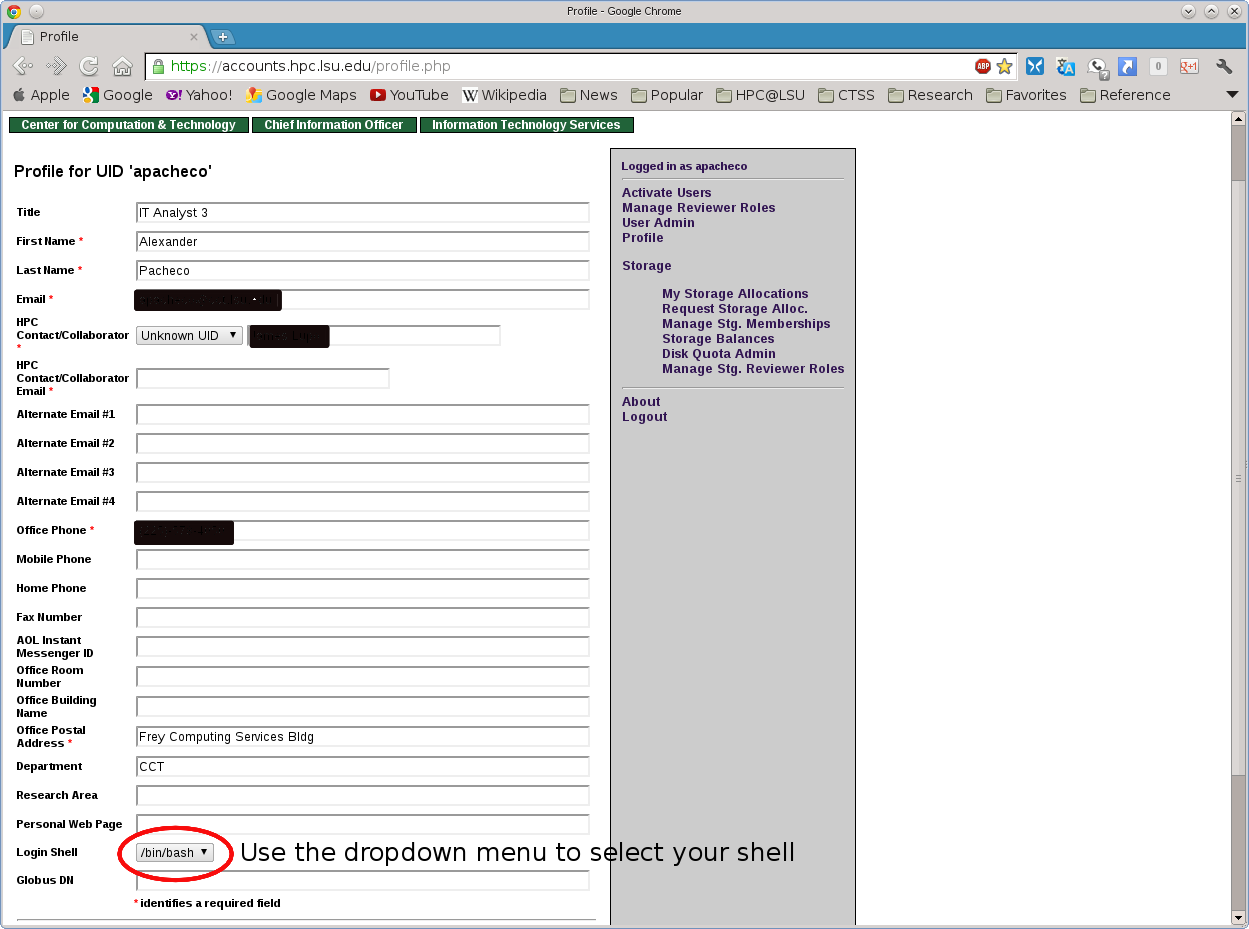
How do LSU HPC users change their login shell?
LSU HPC users can change their login shell on all LSU HPC clusters by visiting their profile on the LSU HPC website
How can users communicate with the LSU HPC systems staff?
Questions for the LSU HPC systems' administrators should be directed to sys-help@hpc.lsu.edu.
LSU HPC Accounts FAQ
Who is eligible for a LSU HPC account?
All faculty and research staff at Louisiana State University Baton Rouge Campus, as well as students pursuing sponsored research activities at LSU, are eligible for a LSU HPC account. For prospective LSU HPC Users from outside LSU, you are required to have a faculty or research staff at LSU as your Collaborator to sponsor you an LSU HPC account.
How can one apply for an account?
Individuals interested in applying for a LSU HPC account should visit this page to begin the account request process. A valid, active institutional email address is required.
Who can sponsor a LSU HPC account or request allocations?
The LSU HPC Resource Allocations Committee require that the Principle Investigators using LSU HPC resources be restricted to full-time faculty or research staff members located at LSU (Baton Rouge campus).
HPC@LSU welcomes members of other institutions that are collaborating with LSU researchers to use LSU HPC resources, but they cannot be the Principle Investigator requesting allocations or granting access. For the Principle Investigator role, Adjunct and Visiting professors do not qualify. They must ask a collaborating full-time professor or research staff member located at LSU to sponsor them and any additional researchers.
LSU HPC Allocations FAQ
How do I access the LSU HPC Allocations website?
To access LSU HPC Allocations, please login to your LSU HPC Profile. Once logged in you should see links on the right sidebar for Balances (to find out current status and usage of your allocations) and Request Allocations (to join or request a new allocations).
How do I find out my active allocations and remaining balances?
Method1
login to your LSU HPC Profile. Once logged in you should see links on the right sidebar for Balances (to find out current status and usage of your allocations).
Method2
Login to any HPC cluster, then run the "balance" command.
[lyan1@mike1 ~]$ balance
======================= Allocation information for lyan1 =======================
   Proj. Name|        Alloc|  Balance| Deposited|    %Used| Days Left|       End
--------------------------------------------------------------------------------
hpc_hpcadmin3|hpc_hpcadmin3 on @mike2| 96718.18| 100000.00|     3.28|       353|2017-06-30
hpc_train_2017|hpc_train_2017 on @mike2| 24968.34|  25000.00|     0.13|       263|2017-04-01


Note: Balance and Deposit are measured in CPU-hours
Method3
Login to any HPC cluster, then run the "showquota" command.
[lyan1@mike1 ~]$ showquota
Hard disk quotas for user lyan1 (uid 24106):
     Filesystem    MB used       quota       files      fquota
     /homem           4305        5000       70073           0
     /work             276           0       70719     4000000
     /project        99951      100000      359579     4000000


CPU Allocation SUs remaining:
    hpc_hpcadmin3:  96730.05
    hpc_train_2017:  24968.34
How do I request a new allocation?
Note: Only faculty members, permanent research staff members and postdoctoral researchers (subject to LSU HPC Resource Allocations Committee Chair review and approval) at the LSU Baton Rouge campus are eligible to be the PI of an allocation. If you are not eligible, please let an eligible PI submit a request and you can join it after it is approved.
Postdoctoral researchers are also eligible to be the PI for both small and research computational allocations (they are NOT eligible for sponsoring user accounts). All research allocation requests submitted by postdoctoral researchers must include 1) "Postdoctoral advisor: [fill in the name of advisor]" in the header (below the proposal title); and 2) a letter from the postdoctoral advisor stating that he or she fully supports the request. Support letters should be appended to the proposal.
To request a new allocation, you first need to login to your LSU HPC Profile and then click on the "Request Allocation" link in the right sidebar. You will see two links there: "New Allocation" and "Join Allocation". Click on the first link. You will then be presented with the Allocation Request form that you need to fill out. Click the "Submit Request" button after you have completed filling the form. The LSU HPC Resource Allocation Committee (HPCRAC) member will review your allocation and let you know of their decision via email. HPC@LSU Support staff do not make decisions on allocations. In case your allocation request has not been responded to in a timely manner, you can either email the HPCRAC committee member directly or email the help desk who will forward the email to appropriate committee member(s).
Would it be possible to request a rollover or extension of an allocation?
In order to keep the accounting straight, allocations cannot be rolled over nor extended. Please apply for a new allocation.
How do I request a new allocation based on my current allocation?
If you have owned allocation before, you can login to your LSU HPC Profile, click on "My Allocations" in the right side bar, and click on "clone/edit" next to your current allocation. The form will be automatically populated using the data of the current one. The form can be edited as necessary, or left everything unchanged.
How do I join an allocation of another PI?
To join an existing allocation of another PI (either your professor, collaborator or our training allocation), you first need to login to your LSU HPC Profile and then click on the "Request Allocation" link in the right sidebar. You will see two links there: "New Allocation" and "Join Allocation".
Click on the second link and enter the name, HPC username or email address of PI whose allocation you wish to join (see screenshot below).
If your search is successful, you will be provided with information of the PI whom you have searched for. Click the "Join Projects" button
You will then be presented with a list of allocations for the PI. Click on the "Join" button for the allocation which you wish to join.
The PI will receive an email requesting him/her to confirm adding you to their allocation. HPC@LSU staff do not add users to an existing allocation of a PI, please do not email the support staff to add you to an allocation. You need to this yourself. If you are planning on attending the HPC Training, please read the instructions that are sent in the training confirmation email.
How does a PI apply for Early Allocation Access?
What is Early Allocation Access?
LSU HPC allows early allocation access, through which a PI could request as much as 25% of a new research allocation request to be activated immediately. See the relevant sections of policy statements
Procedure:
- Then the PI should send an email to sys-help@hpc.lsu.edu, requesting early allocation access using the following template:
Email Title: Early Allocation Access Request: your_allocation_request_name (The allocation request should already be submitted through HPC allocation request page)
A justification paragraph describing your reason for Early Allocation Access Request, including your past allocation usage history, if you have never used HPC resources please include your allocation usage history in other institutions/sites.
- The committee will make a decision based on the justification request. If it's approved, we will activate 25% of the allocation request.
Where can I get more information?
Please look through the LSU HPC Policy page for more information on allocation types and HPCRAC contact information.